OpenAI offers an Accounting plugin for work such as preparing invoices, reconciling transactions and drafting financial reports in ChatGPT. Documentation available on November 20 describes combining Excel workbooks, supporting files and connected accounting applications.
The plugin listing includes QuickBooks, NetSuite, Xero, BILL and FreshBooks. Connections have different permissions: read access does not imply permission to create entries. Accounting is free to install, while available models, tools and usage depend on the plan and workspace settings.
Where the accountant remains involved
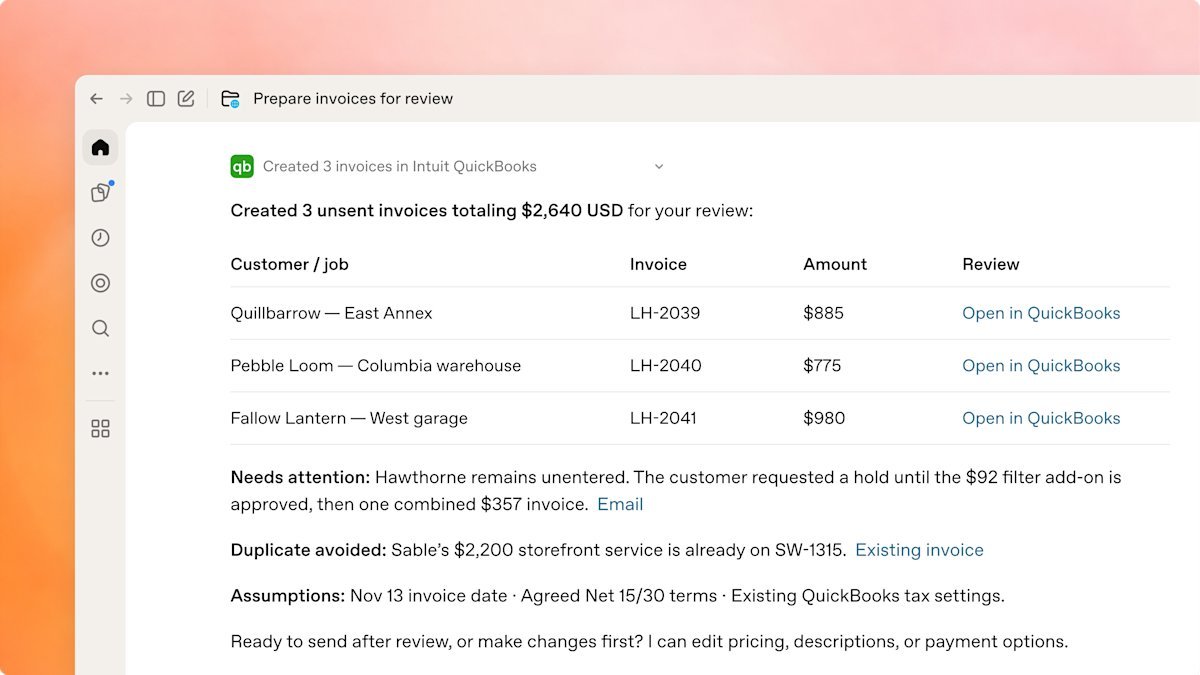
OpenAI’s official demo shows created but unsent invoices, a held case and an indication that a duplicate was avoided. This illustrates the intended review workflow. It is not an independent accuracy measurement or evidence that every exception will be detected.
The setup guide calls for comparing proposed entries with source documents and checking the company, amounts and destination before approval. If an entry’s status is unclear, the accounting application should be checked before the task is repeated.
ChatGPT Business members can install the plugin without prior administrator approval; Enterprise workspaces require it. The documentation describes assistance with accounting work rather than certification of compliance with Greek tax obligations. Availability of each connection and action remains a separate question.
Our sources
- ChatGPT for accounting ↗OpenAI · Checked 20 November 2026
- Using ChatGPT for accounting work ↗OpenAI Help Center · Checked 20 November 2026
- Accounting plugin for ChatGPT ↗OpenAI · Checked 20 November 2026
AI tools assist our editors. Articles are published after human approval. Practical examples are ΠΕΡΑ analysis unless stated otherwise. How we work